
Cloud & networking
Migration From On-Premises to AWS
Organization setup, MGN replication, networking parity, AD/DNS, and RD Gateway.
April 17, 2024·Karam Iqbal·14 min read
Executive summary
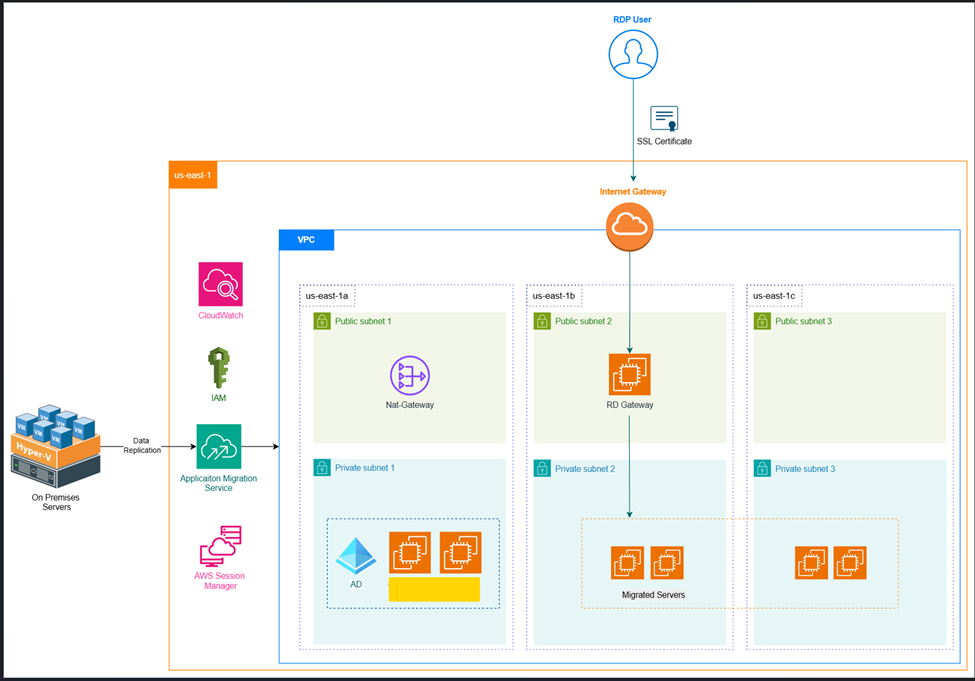
This document outlines the successful migration of on-premises servers to AWS in the mobilize phase. An AWS Organization structure was established with a "development" account in a sandbox OU to manage the migration phase. The AWS infrastructure was built in the us-east-1 region across three Availability Zones. AWS Application Migration Service (MGN) was used for the replication of multiple domain-joined and standalone servers, with custom launch templates keeping IP addresses and security posture aligned with on-premises. Active Directory and DNS servers were replicated first so domain-joined machines could authenticate to the same directory. To enable secure remote access, an RD Gateway was configured with SSL, and servers were placed behind it for private RDP access.
AWS Organization and account
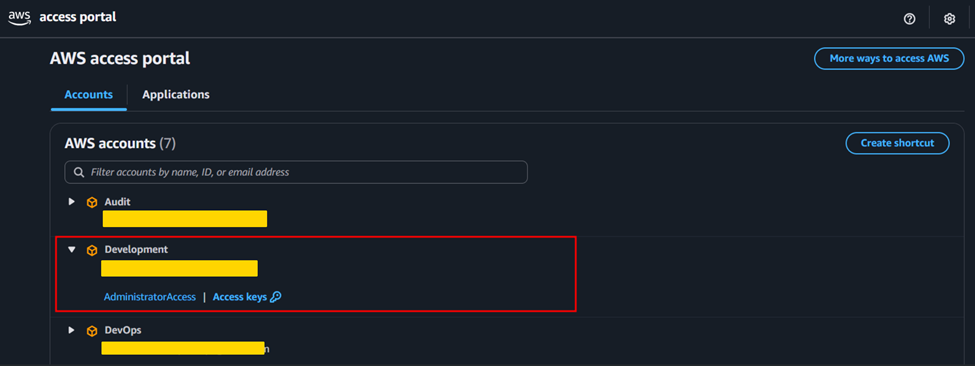
We created a separate OU called "Sandbox" for the mobilize phase and set up a dedicated account used throughout that phase.
AWS infrastructure
Networking setup
A Virtual Private Cloud (VPC) was set up to align with the existing on-premises network design and support migrated workloads.
Internet and NAT gateway
An Internet Gateway and a NAT Gateway provided outbound internet access for resources in public and private subnets respectively. A public subnet was defined to host migrated servers where addressing mapped to the on-premises subnet layout.
DHCP configuration and subnet planning
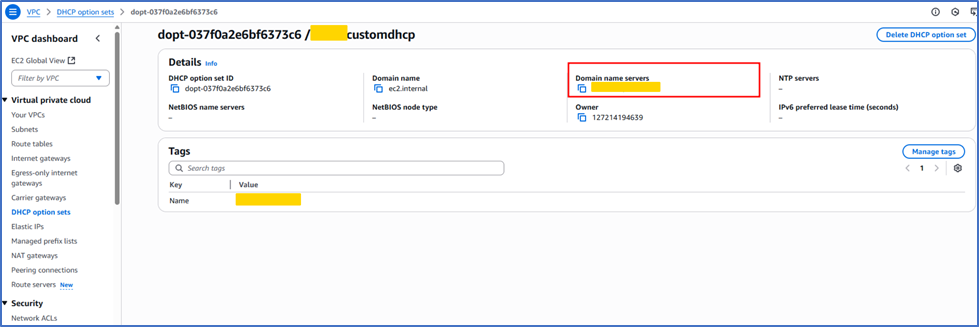
To minimize network changes during cutover, subnet CIDR blocks in AWS matched on-premises (for example 10.0.0.0/24), allowing migrated servers to retain original IPs. A custom DHCP options set directed DNS queries to the designated internal DNS servers so domain-joined hosts could resolve the corporate domain consistently.
Server replication with AWS Application Migration Service
AWS Application Migration Service (MGN)
MGN simplifies migration of physical, virtual, or cloud-based servers to AWS through continuous replication, enabling controlled cutover with minimal downtime.
Setup process
IAM role and STS configuration
An IAM role with STS assume-role trust allowed the replication agent to obtain temporary credentials for AWS APIs securely.
Initialization and replication
After agent initialization, initial sync copied full volumes to AWS. In this engagement, on the order of tens of terabytes were synchronized before cutover planning.
Scope of server migration
During mobilization, the targeted server fleet (names omitted) was replicated into the AWS environment for validation and testing.
Custom launch template
Launch settings preserved:
- The correct VPC and subnet for each workload.
- Original private IP addressing from on-premises where required.
- Security groups tuned for isolation, for example rules limiting unnecessary return paths to legacy on-premises services so AWS-hosted systems behave as an independent slice during testing.
Active Directory and DNS preservation
- Directory services were migrated early so downstream joins and auth continued to work.
- Domain controllers were cut over with consistent IP addressing where planned.
- DHCP/DNS in AWS was prepared before dependent servers launched, avoiding resolution and join failures.
RD Gateway configuration
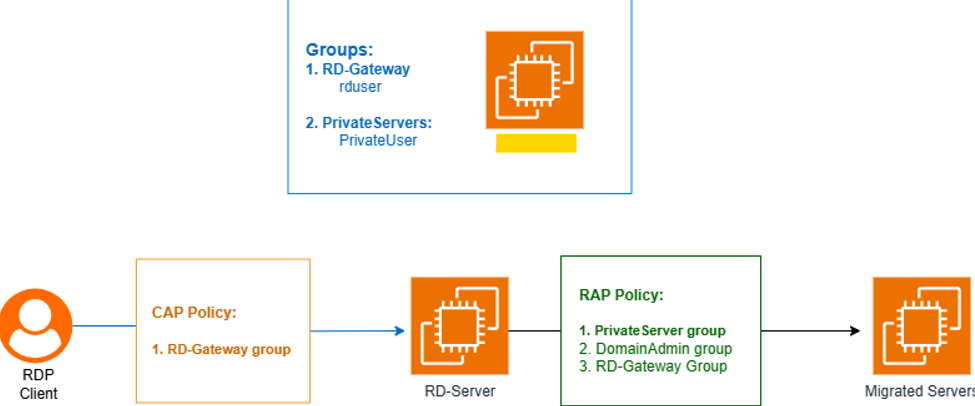
Overview
An RD Gateway enabled secure RDP to private instances without exposing RDP directly to the internet.
RD Gateway role installation
On the designated RD Gateway instance, the Remote Desktop Services role was installed and configured per Microsoft guidance.
SSL certificate configuration
A certificate securing the RD Gateway endpoint was created (for lab use, self-signed; production typically uses a CA-trusted name matching the gateway DNS name).
New-SelfSignedCertificate -DnsName "rdgw.example.internal" -CertStoreLocation "Cert:\LocalMachine\My"The certificate was trusted on administrator workstations that initiate RDP through the gateway so TLS negotiation succeeds.
Active Directory security groups and users
Two AD groups were used for layered access:
- RD-Gateway: users allowed to authenticate to the RD Gateway.
- Private-Servers: users allowed to reach internal servers behind the gateway.
RD Gateway authorization policies
Connection Authorization Policy (CAP)
CAP allowed members of RD-Gateway to authenticate through the gateway.
Resource Authorization Policy (RAP)
RAP granted access to private subnet servers for RD-Gateway, Private-Servers, and Domain Admins as appropriate.
- RD-Gateway
- Private-Servers
- Domain Admins
Together, CAP and RAP constrain who can reach which internal resources.
RDP server permissions
- Each migrated server’s RDP permissions included logon rights for Private-Servers where required.
- Backend access stayed limited to authorized groups.
RDP client configuration
- Clients were configured to use the RD Gateway as the access path.
- Users supplied gateway DNS name and credentials, then connected to internal targets by private IP.